The New Competitive Image Format For Web 👉 WebP
WEBP is a new image compression technology that creates smaller file sizes without compromising on quality

WebP can reduce the file size from 20% to 80% (or even more) compared to JPEG, PNG, and GIF
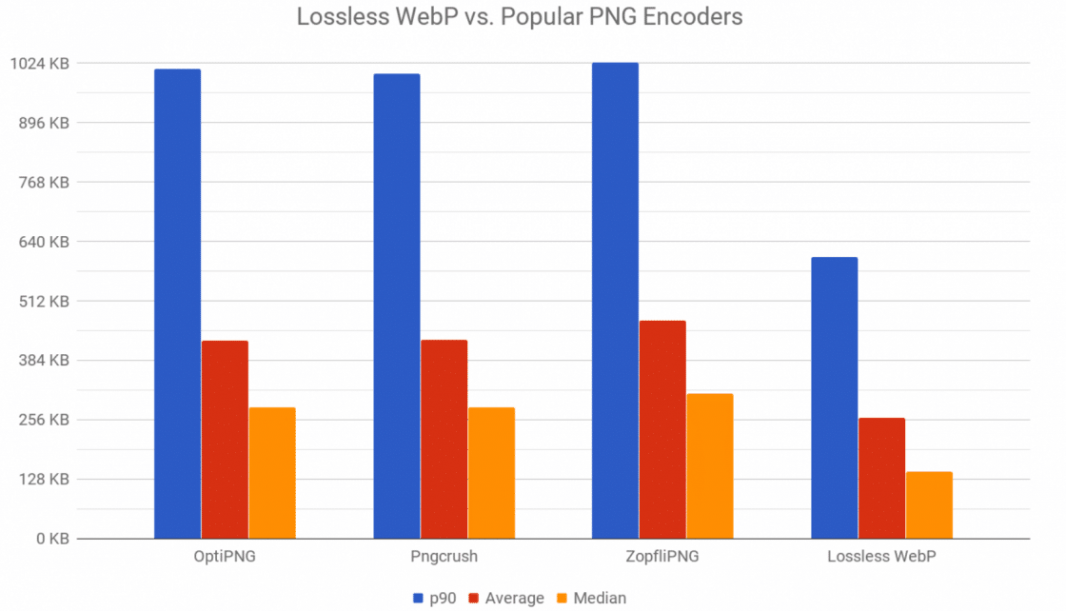
Key Features
🔷 Developer by Google in 2010
🔷 Open Source
🔷 Extension -> .webp
🔷 MIME type -> image/webp
🔷 Lossless Compression
🔷 Supports Animation
🔷 Supports Alpha Transparency
🔷 Used by Google, Bind, Facebook
Browser Support
✅ Chrome >= v9 (2011 year)
✅ Firefox >= v65 (2019 year)
✅ Opera >= v11.5 (2011 year)
✅ Edge >= v19 (2019 year)
✅ Safari iOS >= v14.4 (2020 year)
✅ Safari* >= v14 (2020 year) // Safari needs macOS 11 or later
⛔ Internet Explorer* (no native support) // IE needs fallback/polyfill
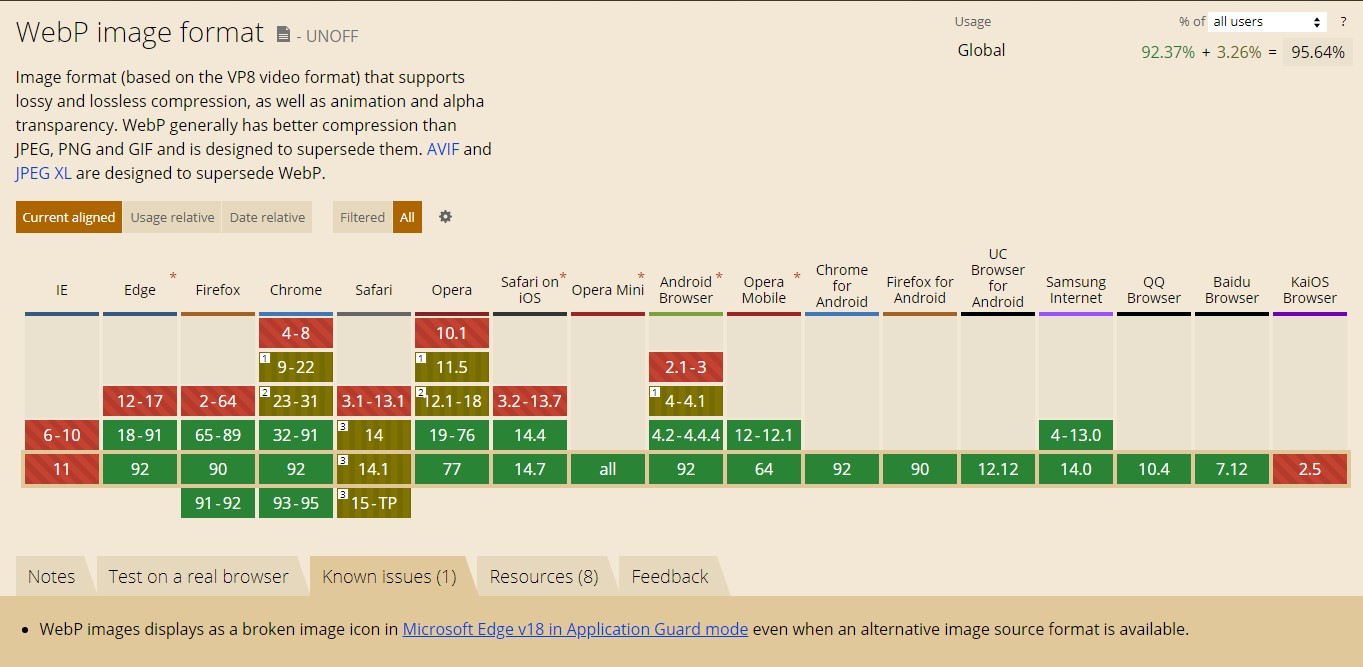
How To Use
1) Using <picture> + <img> tag
<picture>
  <source srcset="img/original.webp" type="image/webp">
  <source srcset="img/fallback.jpg" type="image/jpeg">
  <img src="img/fallback.jpg" alt="Alt Text!">
</picture>
Note This option is recommended, the browser will select its own supported format
2) Using <img> tag only
<img src="img/fallback.jpg" alt="Alt Text!">
Note Only choose this option if you don't care about old browsers (like Internet Explorer)
How To Create
Google has created its own package for Linux, Windows and macOS with command-line tools that can be used to transform your existing images (PNG, GIF, JPG) to WEBP format
Link: https://developers.google.com/speed/webp/download
This package includes:
- The libwebp library, which can be used to add WebP encoding or decoding to your programs.
- cwebp -- WebP encoder tool
- dwebp -- WebP decoder tool
- vwebp -- WebP file viewer
- webpmux -- WebP muxing tool
- gif2webp -- Tool for converting GIF images to WebP
Usage (Windows Example)
cwebp.exe delivery_parcel.png -q 80 -o delivery_parcel.webp
delivery_parcel.png- source file-q 80- quality param set to 80%-o delivery_parcel.webp- output file
Online Converters
- https://cloudconvert.com/webp-converter
- https://convertio.co/png-webp/
CMS & JS Frameworks Support
CMS
- Drupal: https://drupal.org/project/webp
- Joomla: https://extensions.joomla.org/instant-search/?jed_live%5Bquery%5D=webp
- Magento: https://marketplace.magento.com/catalogsearch/result/?q=webp
- WordPress: https://wordpress.org/plugins/search/convert+webp/
JS Frameworks (that has optimized image component)
- NextJS
- Gatsby
- Nuxt
CDN Automatic Conversion
Some CDNs support automatic next-gen conversion of your images, like Cloudflare (although it's not a free feature and comes with a PRO plan - $20/mo)
Thanks for reading 👍
Follow me on Twitter - https://twitter.com/therceman
About the author
Web Developer +15 years, Bug Bounty Hunter +5 years, Email: contact@therceman.dev
Comments
Join the discussionNo comments yet. Be the first to comment.


